Table of Contents
Why Is Google Ranking the Wrong Page on My Website?
You build a page aim it at one specific search term and wait. Then you check Google. And a different page from your site shows up instead. Not a rivals page. Yours. Just the wrong one.
If Google is ranking the page on your website you’re not misreading anything and its more common than it looks. This particular problem is confusing precisely because nothing appears broken. The site is indexed the content’s published traffic might even be flowing in. Its simply landing on the wrong URL instead of the one you built for that search.
I hit this wall on my own site. Certain searches weren’t pulling up the page I expected all. Google kept showing a different URL from my own domain instead. Digging into it I found the culprit: several pages covering territory that was just similar enough to confuse Google about which one deserved the spot. That discovery changed how closely I look at what each page’s targeting what its meant to do for the reader and how the site links to itself.
Here’s what actually causes wrong page ranking in Google, how to check whats going on before touching anything and what fixed it for me.
What Does It Mean When Google Ranks the Wrong Page?

When Google shows an URL from your site than the one you intended it usually means more than one page on your domain could plausibly answer that same query. Googles system evaluates every page and picks whichever one it judges closest to what the searcher wants. And that judgment doesn’t always land where you’d like.
The SEO term for this is keyword cannibalization: two or more pages competing for the term, which leaves Google to sort out the winner instead of letting your intended page stand on its own. It’s one of the common reasons behind Google ranking the wrong page in the first place.
This is one of the clearest signs of Google ranking the wrong page: multiple URLs on the same website are sending similar relevance signals for the same search.
It’s almost never a fault. It’s a clarity problem. Somewhere in your content or your linking structure you’re telling Google that two pages are roughly interchangeable. It makes the call for you and often ends up ranking the wrong URL as a result. When Google ranking the wrong page becomes a recurring pattern, it’s worth checking whether your pages are sending mixed signals about which URL should satisfy the search.
Why This Happens: The Patterns Behind Wrong Page Ranking in Google
A handful of causes show up repeatedly when I look into sites with this issue.
Multiple pages ranking for the keyword. A service page a blog article and a supporting page can each be written with intentions and still end up covering nearly identical ground once you line them up side by side. This is the direct path to Google ranking the wrong page. When several pages could answer the same query something has to give.
When Google ranking the wrong page happens repeatedly, it is often a sign that two URLs are competing for the same relevance signals.
Search intent that isn’t clearly separated. Two pages can chase the keyword while serving different purposes. One explaining a concept the other selling a service. If that split in search intent isn’t obvious in the writing itself Google won’t reliably catch it either. This is another reason Google may end up ranking the wrong page even when both pages contain the target keyword.
Internal links pointing the “way. If your own site links often or with stronger anchor text toward a page other than the one you want ranked you’re effectively voting for the wrong URL yourself.

Headings that look nearly identical. With different body content, two pages with near-matching H1s make it harder for Google to tell them apart.
Service or location variations, for local businesses. This one comes up constantly. Separate pages built for services or the same service across different areas often end up chasing closely related terms without a real difference in search intent behind them. Once Google sees pages ranking for the same keyword it won’t necessarily pick the one you had in mind.
What I Actually Did to Fix It on My Own Site
When I first noticed Google ranking the page for my own content I didn’t start deleting or merging anything. I looked first at what each page was trying to achieve and where those goals overlapped.
From there the changes were specific than sweeping. The goal wasn’t simply to stop Google ranking the wrong page; it was to make the intended page the clearest and most relevant result for that search.
Narrowed each pages keyword focus so they stopped competing for the ground
Rewrote sections of content so each page matched its own distinct search intent more precisely
Rerouted internal links so the page I wanted to lead was the one getting reinforced
Reworked titles and headings so pages that used to sound identical now read as clearly separate
The lesson that stuck with me: solving a wrong page ranking issue rarely means cutting content. Often it means making the relationship between your pages obvious to Google instead of leaving it ambiguous.
How to Check Which Page Google Is Ranking
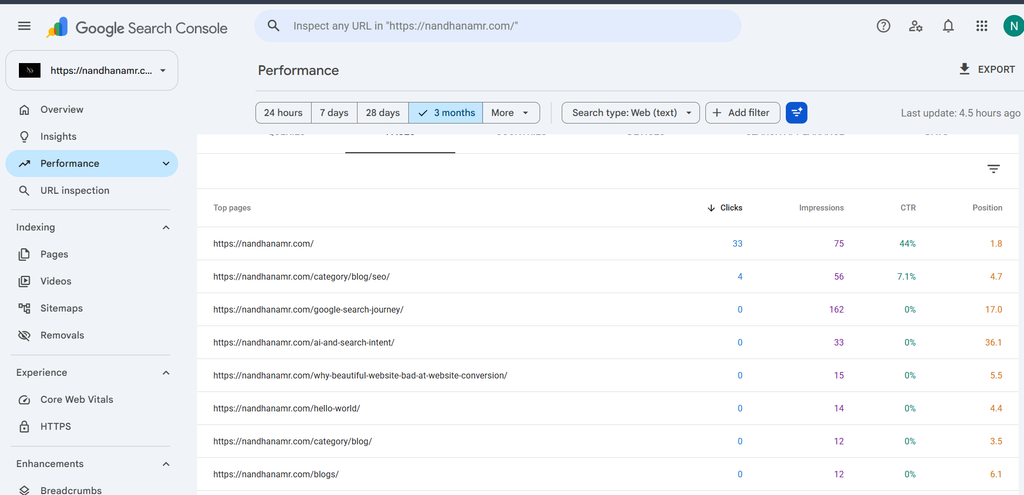
Before changing a single word figure out exactly what’s happening first. The first step in diagnosing Google ranking the wrong page is finding the exact query and comparing the URLs that appear for it.
If you suspect Google is ranking the wrong page, start by identifying exactly which query and URL are involved.
Open Search Consoles Performance report. Filter to the query and see which of your URLs is actually pulling the impressions and clicks. This tells you definitively which page Google is ranking, wrong or not.
Run URL Inspection on both pages. Compare how Google has indexed the page you want against the one its currently showing.
If you suspect Google is ranking the wrong page, start by identifying the query and the URL receiving impressions for it.
Read both pages back to back. Look honestly at keyword focus search intent, titles, headings and how much the subject matter genuinely overlaps.
Audit your internal links. Check whether your site is quietly reinforcing the page you didn’t want through frequent or more prominent links.
None of this is about fixing anything. It’s about figuring out why Google is ranking the URL in the first place. Once you know that can you decide whether the right move is a rewrite, a linking change, a merge or leaving both pages exactly as they are.
Mistakes That Make Keyword Cannibalization Worse
Two habits come up again and again when people try to fix Google ranking the wrong page themselves.
Moving fast, Deleting pages before understanding why Google picked the other one can erase work that was fine to begin with or leave gaps you didn’t mean to create.
Piling keyword onto the preferred page. If both pages still cover the same ground with the same search intent repeating the keyword more often on your favored page won’t untangle anything. The real overlap and the keyword cannibalization causing it is still sitting there untouched.
A better question to start with: whats making these two pages look interchangeable to Google? Fix that thing. Overlapping content, unclear search intent competing internal links or near-identical headings. You’re not trying to force Googles hand. You’re trying to make your preferred page the better answer so Google stops ranking the wrong page by default.
Merge, Rewrite or Leave Alone?
Same keyword, same intent on both pages → Combine them into one stronger page
Same keyword, genuinely different intent → Sharpen titles, headings, and content to reflect each intent
One page is thin or stale → Strengthen it, then redirect links toward it
Different purpose, but overlapping wording → Adjust language and linking rather than merging
The right fix depends on why Google is ranking the wrong page in the first place.
Where This Advice Has Limits
This isn’t an instant fix for a wrong page ranking problem. Google needs time to recrawl and reassess whatever you change so results take a while to show up. It’s also worth being upfront that no two sites are alike: a large store with hundreds of duplicate product pages needs a different approach than a small service site with three overlapping pages. What worked for my site won’t map onto every situation exactly but the underlying method. Understand the cause before you touch anything. Holds regardless of scale.
If Google is still ranking the wrong page after your changes, give the site time to be recrawled and reassessed before making another round of changes.
FAQ
Why does Google keep showing my page instead of the new one?
Usually because the older page still carries signals. More internal links, more backlinks or content Google currently reads as the closer intent match. Building up the pages signals tends to work faster than simply waiting it out.
Is keyword cannibalization a problem?
Not automatically but its worth checking. When Google is choosing between two of your pages you’re likely splitting ranking strength between them even if one is still performing decently on its own.
Does merging pages hurt rankings?
Done properly with redirects merging tends to help more than it hurts. The risk isn’t the merge itself. Its merging before you understand why the pages were competing in the place.
Conclusion
Google ranking the page, on your site isn’t a glitch. It’s Google reading mixed signals across pages you control. Skip the guesswork: pull up Search Console to see whats really happening compare the competing pages side by side and fix the cause whether thats overlapping content blurry search intent or internal links pointing the wrong way. Understand why Google is ranking the URL first then make your preferred page the clearest answer available. That beats deleting content or stacking keywords every time.